
Utility
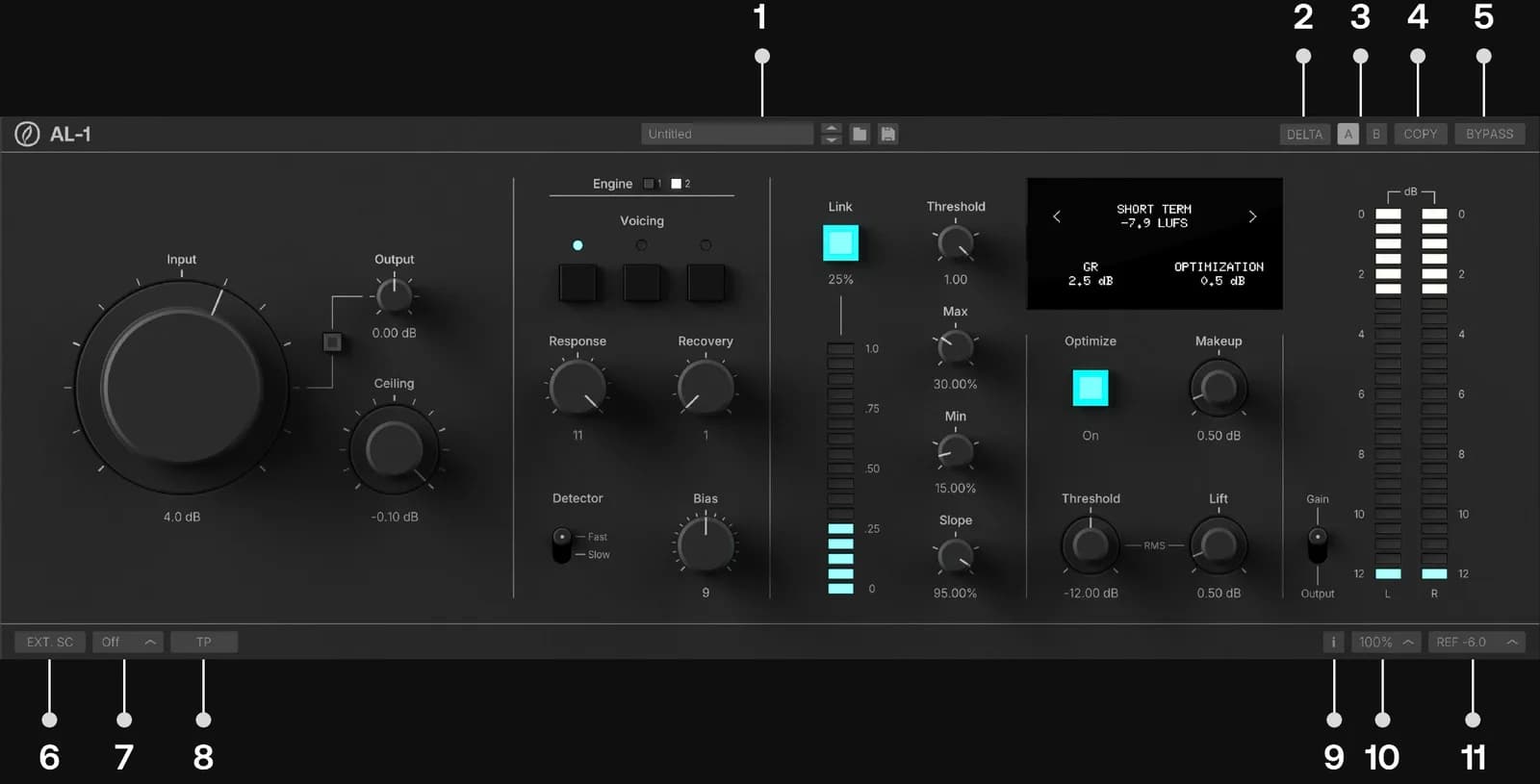
- Preset Manager: Save, organize, and recall presets from the top ribbon. Save As... creates a new preset, Overwrite updates the loaded one, and presets can be filed into your own categories. Reveal Presets Folder opens the preset location on disk for backup and sharing.
- Delta: The Delta button in the top ribbon auditions the limiting difference between the AL-1's gain-matched, latency-aligned input and its processed output — you can audition exactly what the limiter is adding and removing.
- A/B: Built in A/B functionality to quickly audition settings.
- A/B Copy: This button copies active settings to the inactive A/B selection.
- Bypass: Delay compensated internal bypass.
- External Sidechain (Ext. SC): Useful for printing stems or triggering limiting from a key input.
- Oversampling Factor: Sets the oversampling factor of the AL-1.
- True Peak Toggle: Enable/disable the True Peak circuit.
- Tooltips: Enable/disable tooltips. Tool tips always appear in the center of the bottom ribbon of the GUI.
- GUI Scaling: Scale the GUI from 50% to 150%.
- VU Reference Level: This control sets the VU meter's reference level from -18 to 0 dBFS.